Updates

What changed in each Fantasma release.

  1. 2.1.0

    Link color in more blocks and a Contact page with a form

    Fantasma 2.1.0 brings Link color to more text blocks, a Contact page that starts with a contact form, and canvas motion without jumps.

    • Added Link color to the Heading, List, Image, Collapse, Label and Option blocks. Read the guide
    • Added typography, colors and spacing to the Label of a form field. Read the guide
    • Improved the recommended Contact page to start with a contact form instead of two buttons. Read the guide
    • Improved switching the color mode or color scheme to crossfade in the preview, without a section flashing the site background.
    • Moved Link color on Paragraph and the post data blocks from Appearance to Colors, keeping any value you set.
    • Fixed blocks in built-in patterns and headers ignoring a change to the section's Alignment.
    • Fixed blocks jumping while the canvas animates a size change, such as an image squashing when its caption is turned on.
    Show 7 more changes
    • Improved image captions to show their links in the accent color by default.
    • Fixed Justification and Alignment showing in the toolbar of a custom block, where they had no effect.
    • Fixed a cleared Width drawing the block only as wide as its content while the panel showed the section's Content Width.
    • Fixed custom templates listed above Tag, Author and Error, which made those look like custom templates.
    • Fixed the button in the Background Image newsletter pattern ignoring your color scheme.
    • Fixed the Stacked Social and Centered Minimal footer patterns showing a large empty box on the canvas.
    • Fixed cookie banner buttons losing their Extra Small size the first time you edited the pattern.
  2. 2.0.0

    Fantasma 2.0

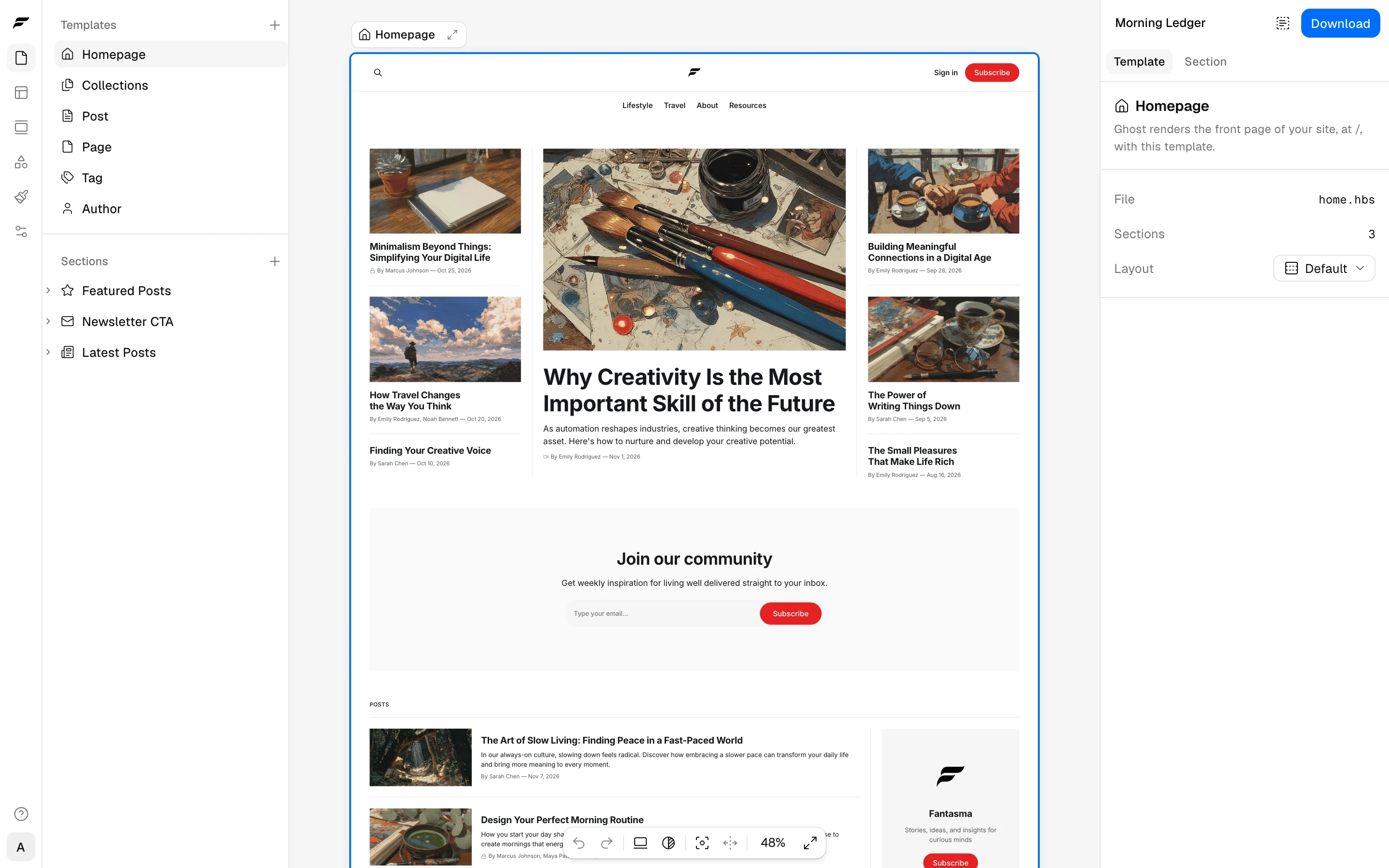
    Fantasma 2.0 puts every page of your theme on one canvas and builds everything on it from blocks, which you can save as patterns and style in one place. Every builder feature is on the Free plan, and downloading the theme or publishing it to Ghost now needs Pro. Your projects convert to Fantasma 2 the first time you open them.

    The Fantasma editor with a homepage of featured posts and a signup form, the Sections list on the left and template settings on the right

    One canvas for every page

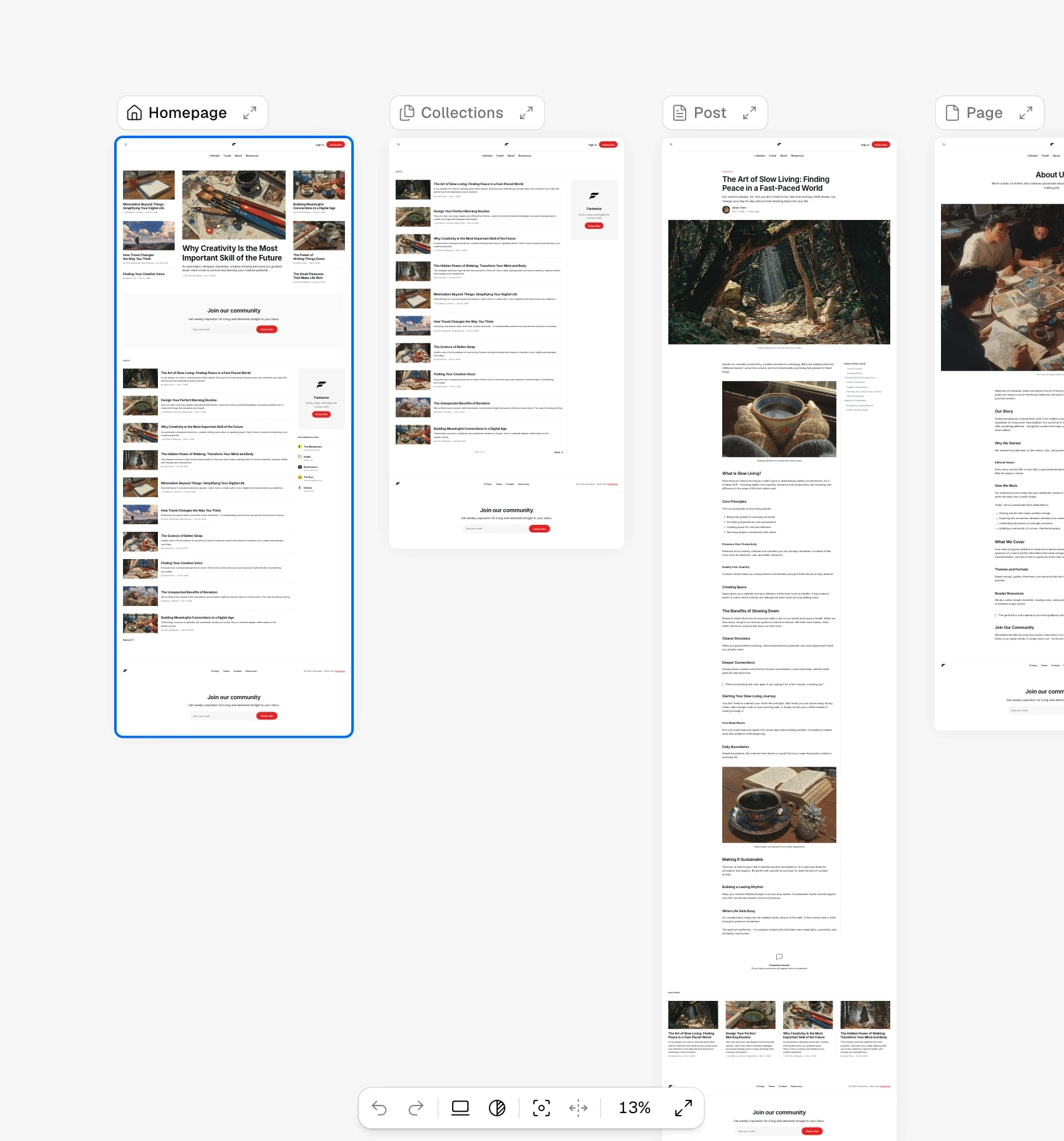
    The editor shows each template of your theme as a live frame on one canvas, with the homepage, collections, posts and pages side by side. Zoom out to see them all, or click Fullscreen to work on one page at a time. Click a section to select it, click again to reach the block under the pointer, and type into headings and paragraphs right on the page. A toolbar floats over the selected block, with buttons to move it, set its width and alignment, and open its menu.

    The canvas zoomed out to 13 percent, with the Homepage, Collections, Post and Page templates side by side as live frames

    Select blocks inside a section, Edit text on the canvas and Preview your theme show how to work on the canvas.

    Everything is built from blocks

    A page is a stack of sections, and most of them are now one kind, named Section, which was the Banner section in Fantasma 1. A Section holds blocks, such as headings, paragraphs, images, buttons and menus. A Group lines blocks up in a stack, a row or a grid, and Groups go inside Groups, so one Section can hold columns, cards and sidebars. A Collection repeats one design for each post, tag, author or tier from Ghost, and data blocks such as Title, Date and Author fill it with your content. Forms are blocks too, made of fields and a button.

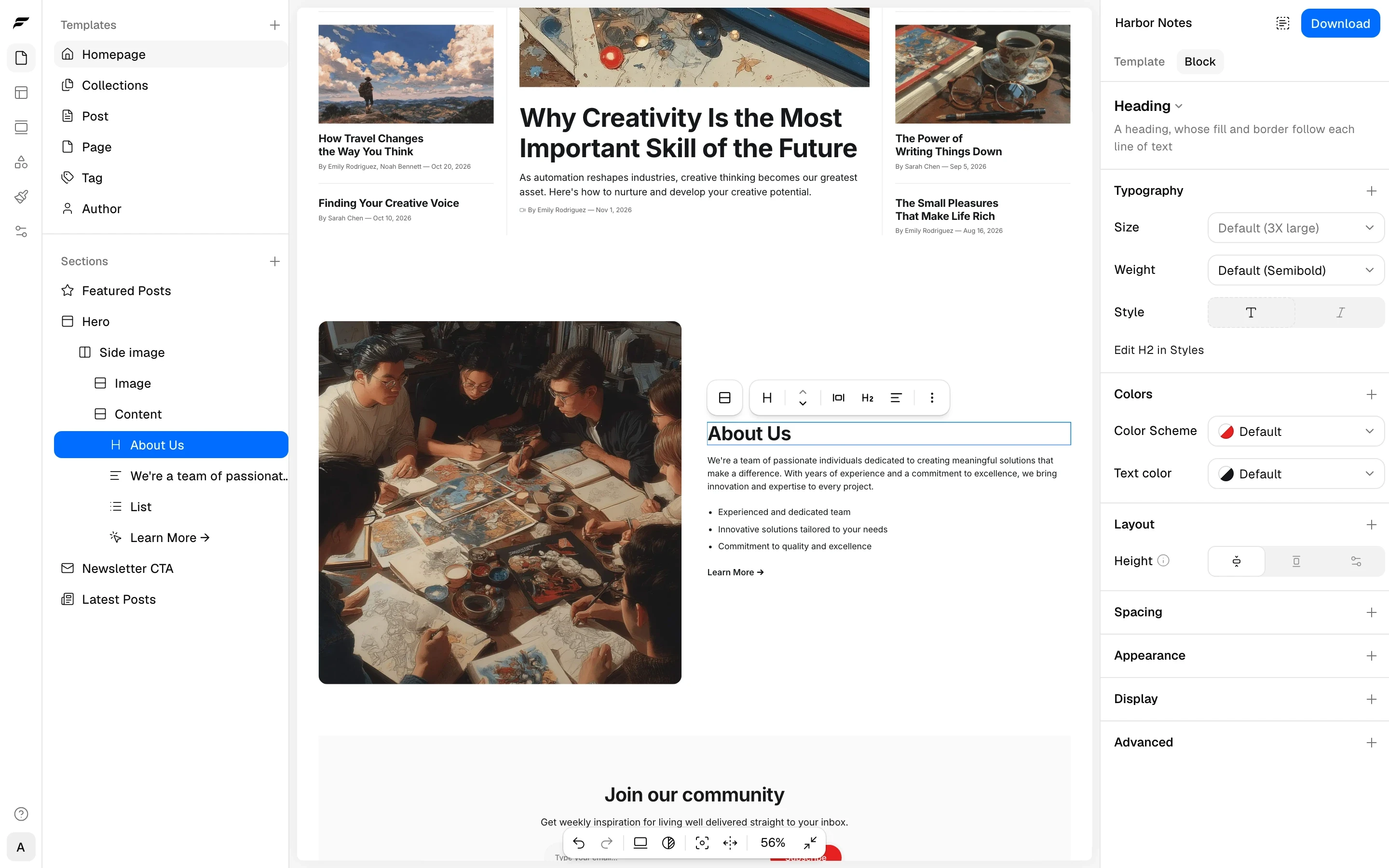
    An About Us heading selected on the canvas, nested in the Hero section's Side image and Content groups in the Sections list, its settings on the right

    Read more in Add blocks to a section, Group, Show a list of posts and Data blocks.

    Linked patterns

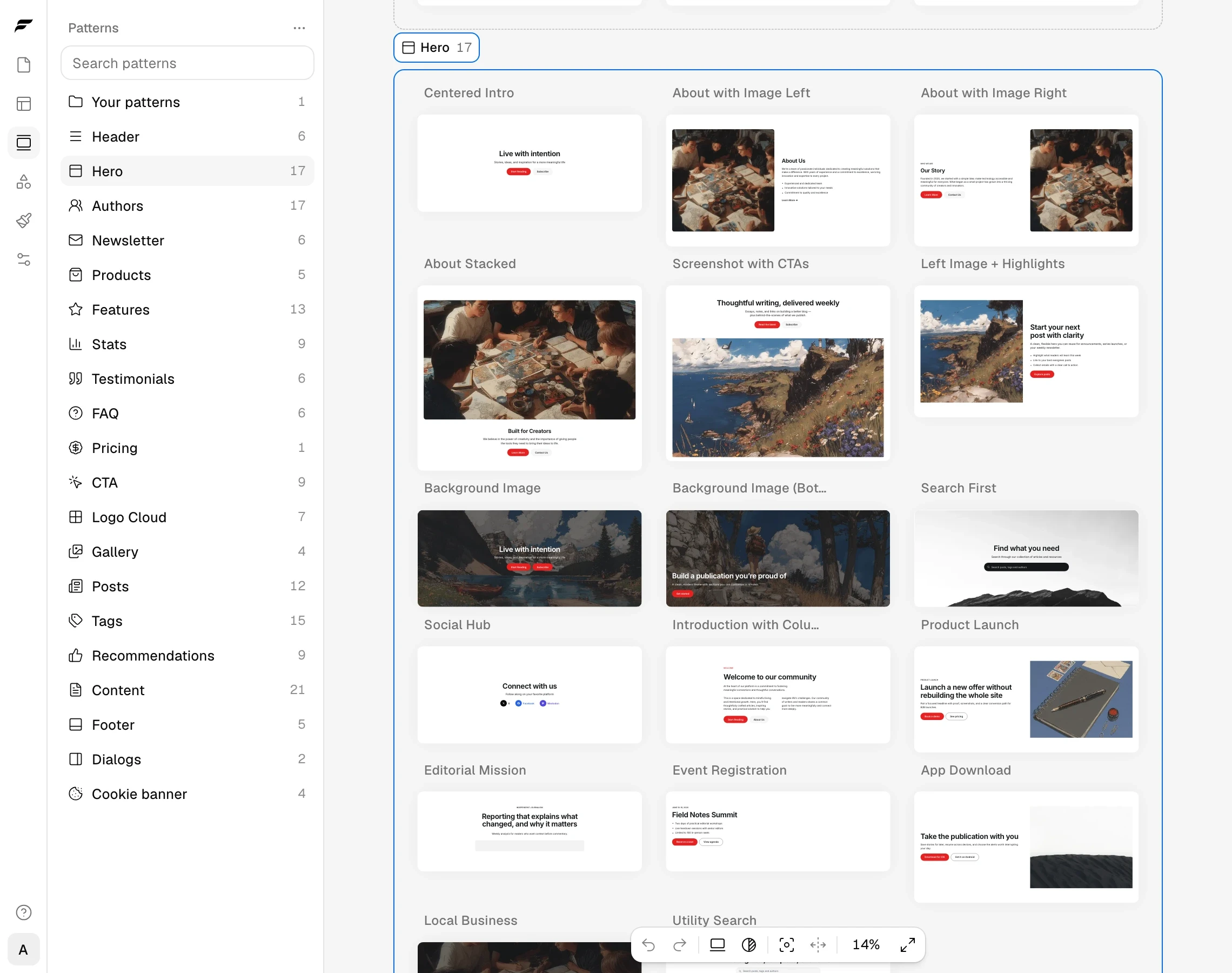
    Fantasma comes with more than 170 built-in patterns in 20 categories, from heroes and post lists to footers and cookie banners. A section you add from a pattern stays linked to it. Edit the pattern once, and every page that uses it changes, while each page keeps its own text, links and images. Save any section as a pattern of your own. Turn on Content area for a part of a pattern, and each page can add its own blocks there without breaking the link.

    The Patterns panel with its categories and their counts, and the 17 Hero patterns laid out on the canvas

    How patterns work explains linking, Edit pattern, Change only here and Detach. Built-in patterns lists every category.

    Styles for the whole theme

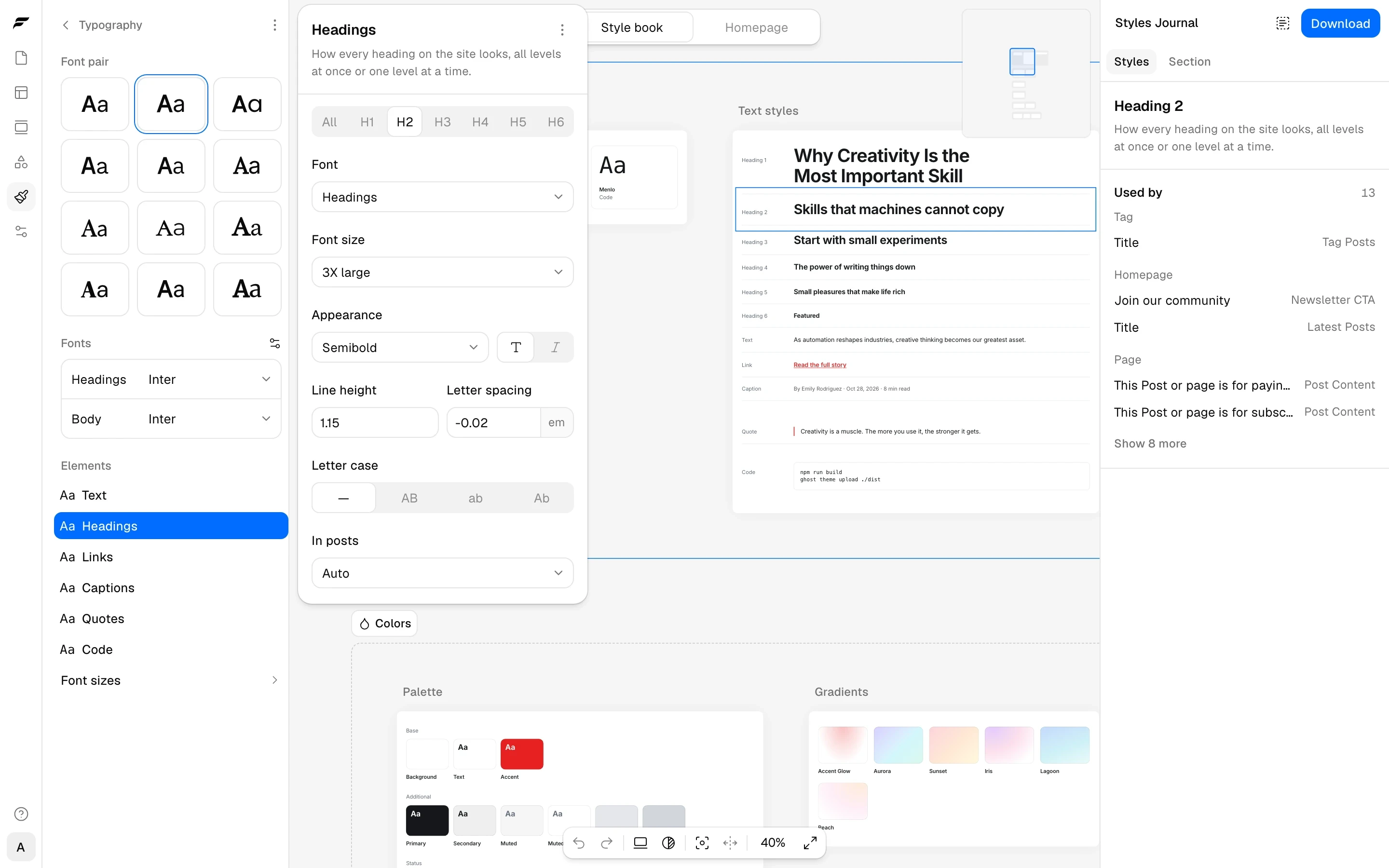
    Styles hold the design every page shares: the font pair and text styles, the color scheme in light and dark, gradients, shadows, corners, page widths, spacing and motion. Blocks pick named presets from Styles, so a change to a preset changes every block that uses it, and a Used by list shows where that is. The Style book shows every font, color, shadow and corner on one sheet. Posts you write in Ghost Admin follow the same styles.

    The Typography screen of Styles with the Headings style open, the Style book on the canvas, and the list of places that use Heading 2

    See How styles work, Change your fonts, Change your colors, Shadows and corners and Motion and page transitions.

    Variants, formats and custom blocks

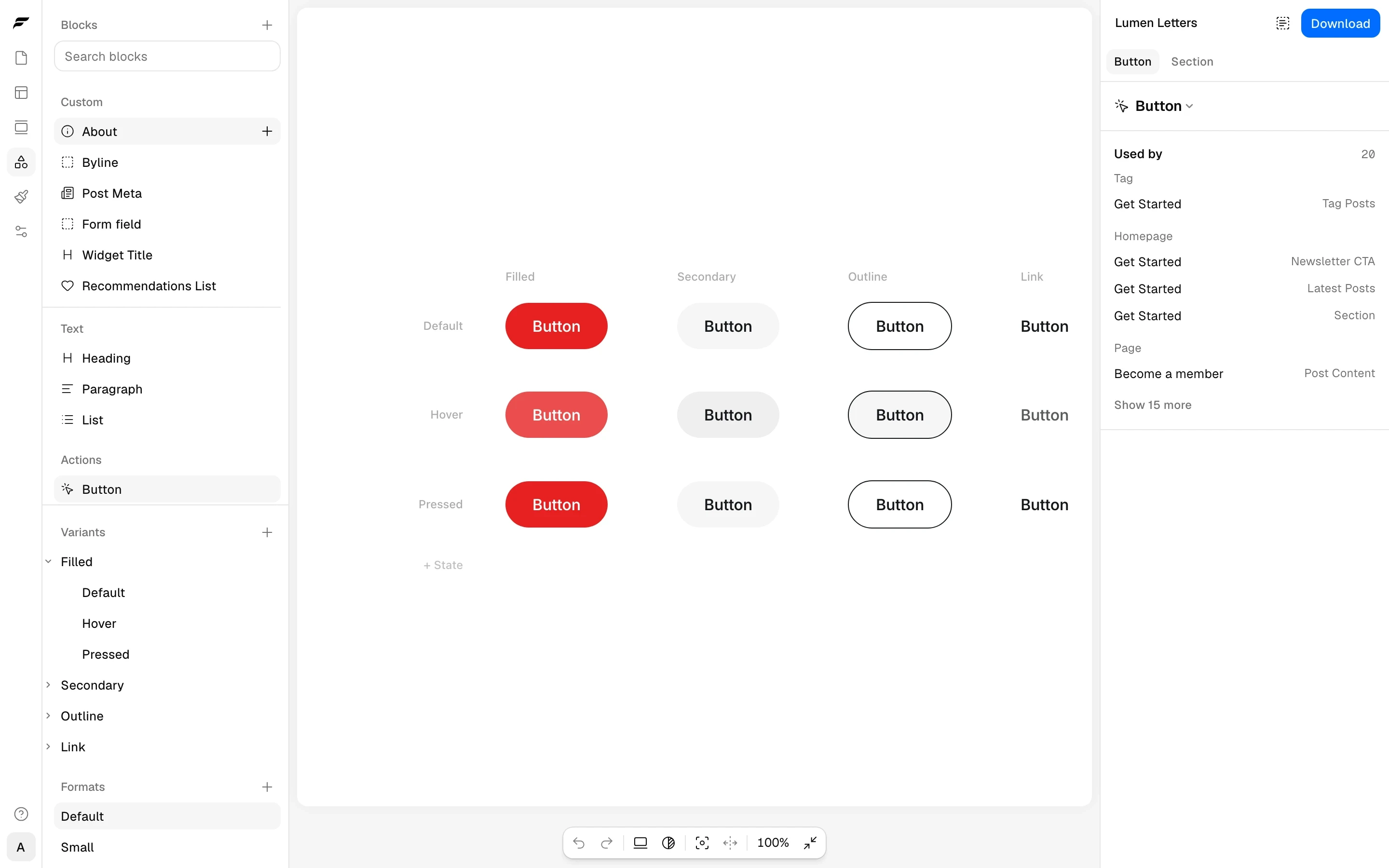
    The Blocks panel holds how each kind of small block looks, such as a button, a link, a heading or a form field. A variant is one look, such as Filled or Outline for a button, with its own Hover and Pressed states. A format is a size, such as Small. Change a variant once, and every button that uses it changes. Turn any block or Group into a custom block to reuse one design with different content in each place, such as a team member card.

    The Button in the Blocks panel, with Filled, Secondary, Outline and Link variants as columns and Default, Hover and Pressed states as rows

    How block variants and formats work and Create a custom block explain both.

    Members and forms

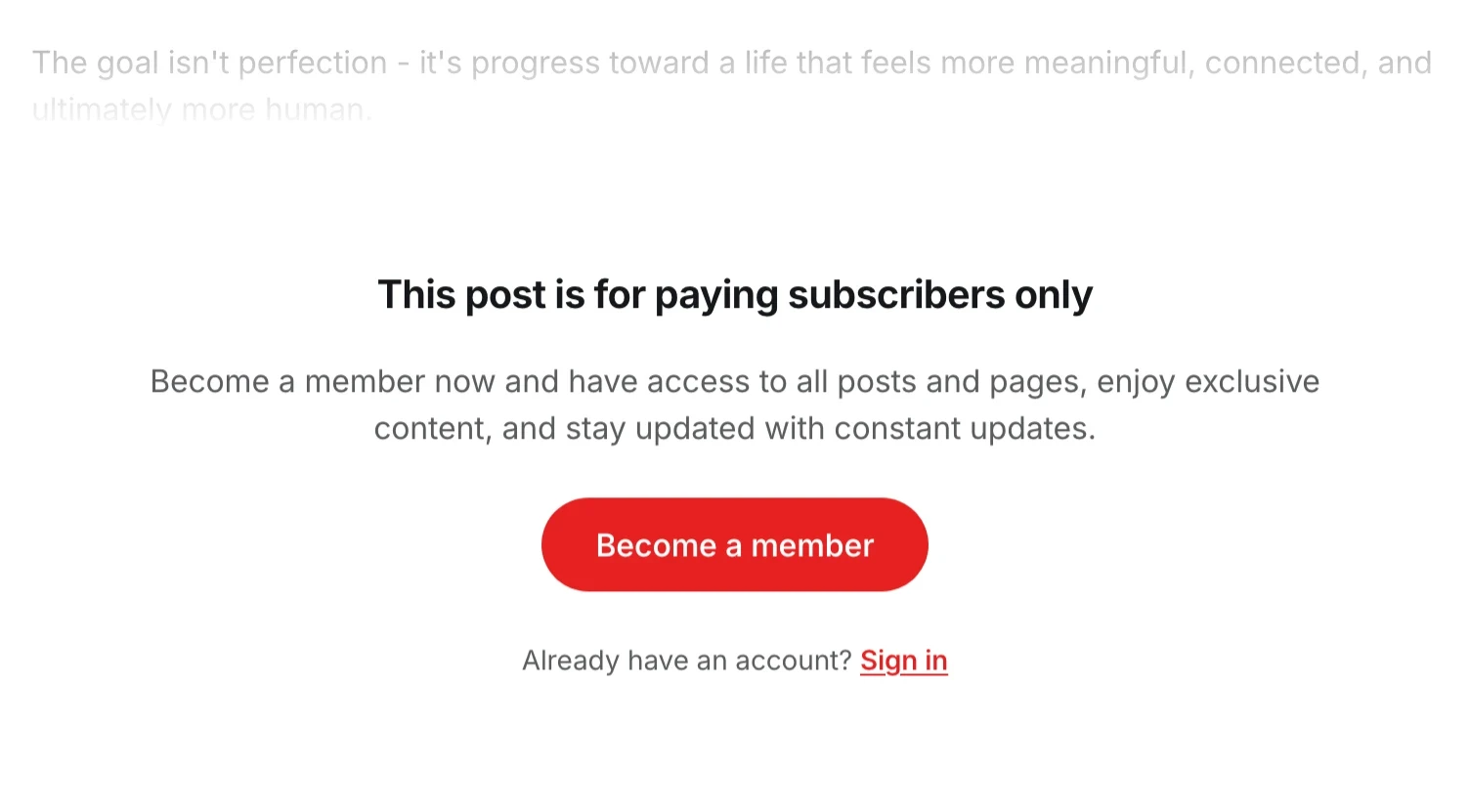
    The Form block signs readers up for your newsletters, sends members a sign-in link, or sends a contact form to an address you choose. The Paywall is what a locked post shows readers without access, in place of the rest of the text, and any Button can open Ghost's Portal at the sign-up, sign-in or account page. Audience, in a block's Display settings, shows the block only to visitors, members, paid members or the tiers you pick. A pricing section lists your tiers with their prices from Ghost.

    A locked post fading out above a paywall that reads This post is for paying subscribers only, with a Become a member button and a Sign in link

    Start with Add a newsletter signup form, Add a contact form, Change what readers see on a locked post and Show content only to members or some tiers.

    Site settings

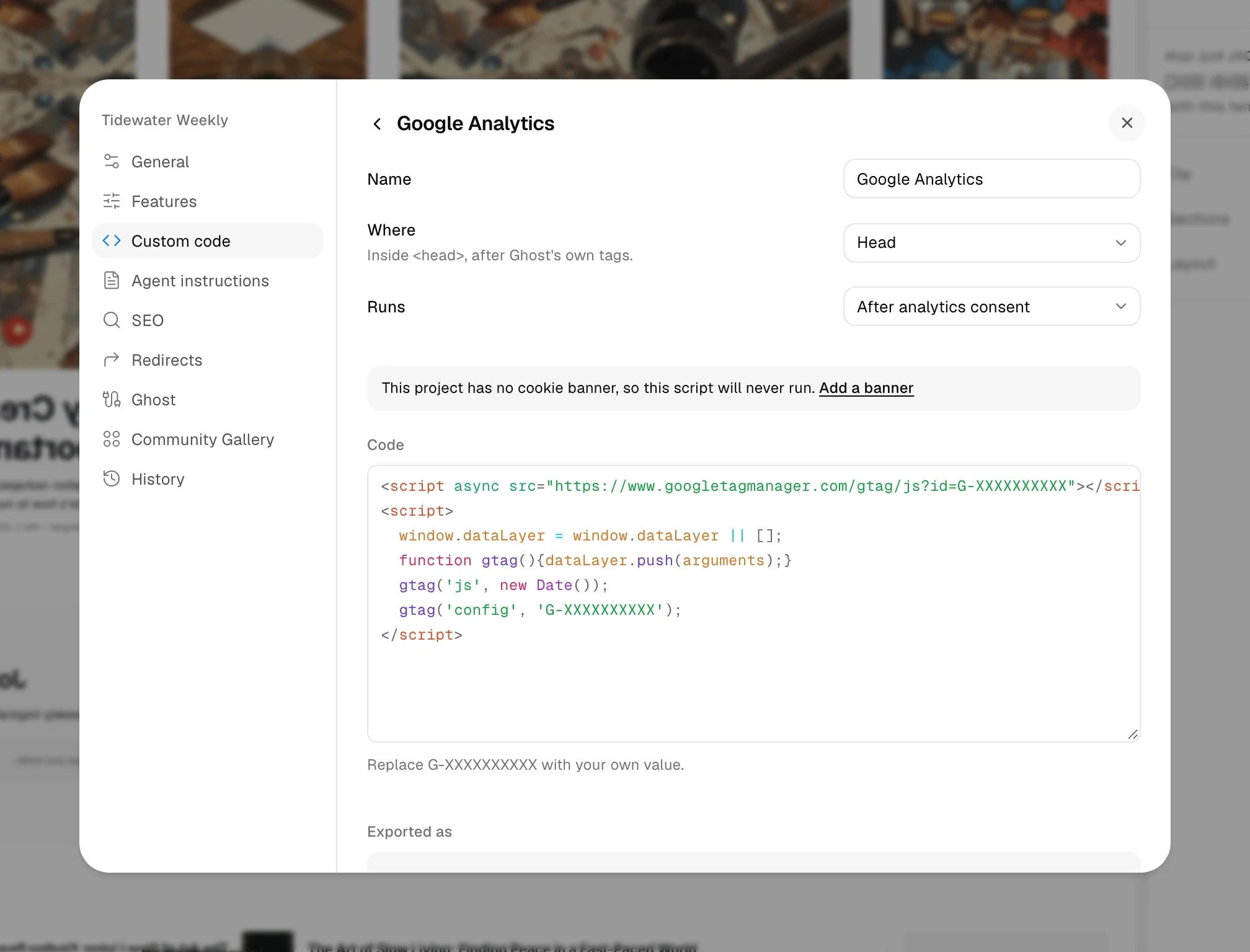
    Project settings open in a window of their own, with a page for each area. Custom code adds scripts, such as analytics, to every page, and each script can wait until the visitor agrees in your cookie banner. Redirects lists the old addresses your site should forward, and SEO can keep AI crawlers out with Block AI crawlers or your own robots.txt.

    The Custom code page of Project settings with a Google Analytics script set to run in the head after analytics consent

    See Add analytics and other scripts, Add a cookie banner, Set up redirects and Control search engines and AI crawlers.

    Publishing to Ghost

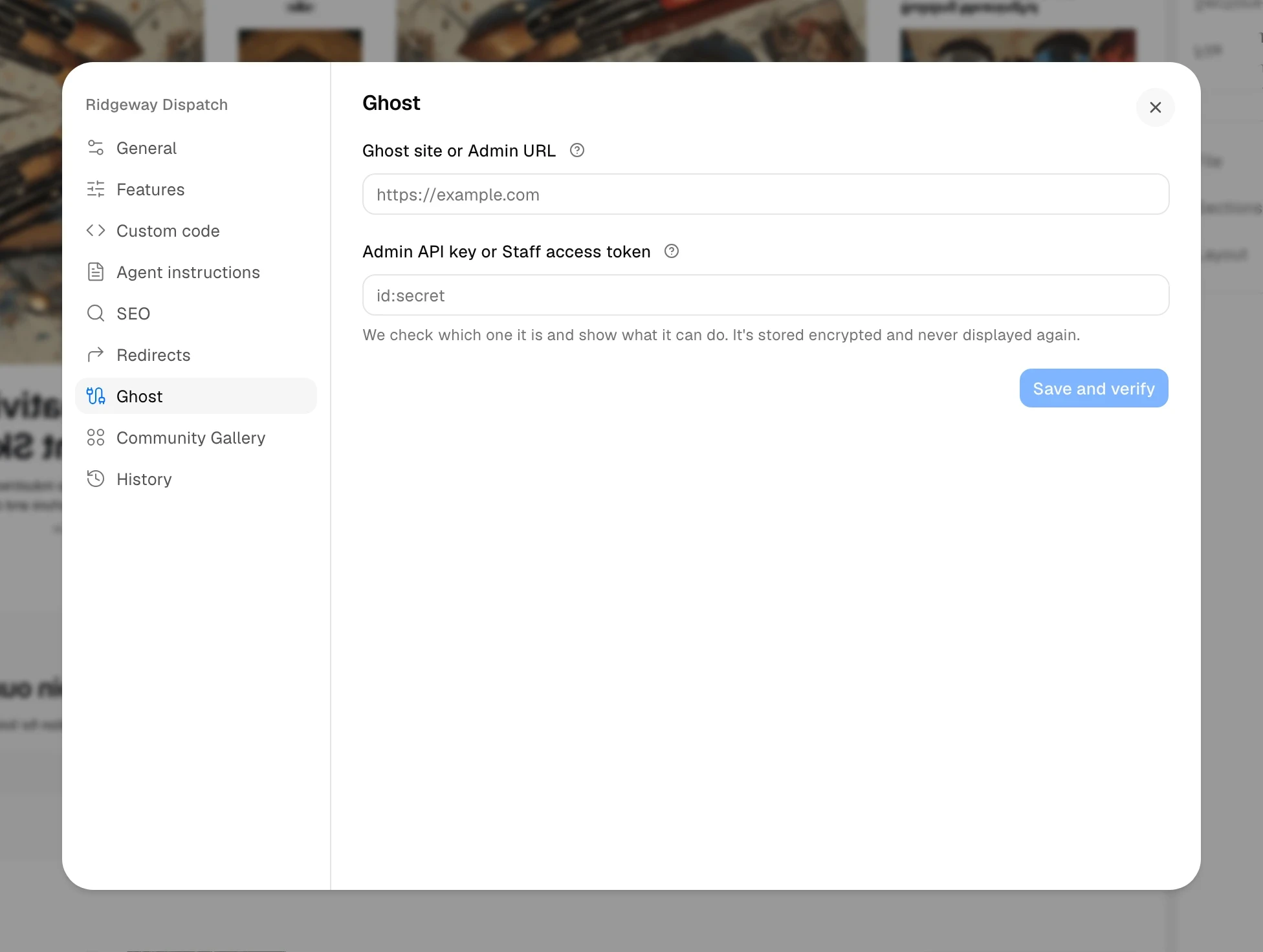
    A Ghost connection takes either an Admin API key from a custom integration or a Staff access token from your own staff profile in Ghost Admin. If you connect with the token, publishing also uploads routes.yaml, the file where Ghost reads the addresses of your collections, tag pages and author pages. That upload replaces any routes.yaml your site already has, as Upload routes.yaml explains. With the token, Upload to Ghost on the Redirects page also sends your redirects. Theme name, in Project settings › General, sets the name Ghost lists your theme under.

    The Ghost page of Project settings with the fields Ghost site or Admin URL and Admin API key or Staff access token

    Connect your Ghost site compares the two keys, and Publish your theme to Ghost covers the rest.

    AI agents

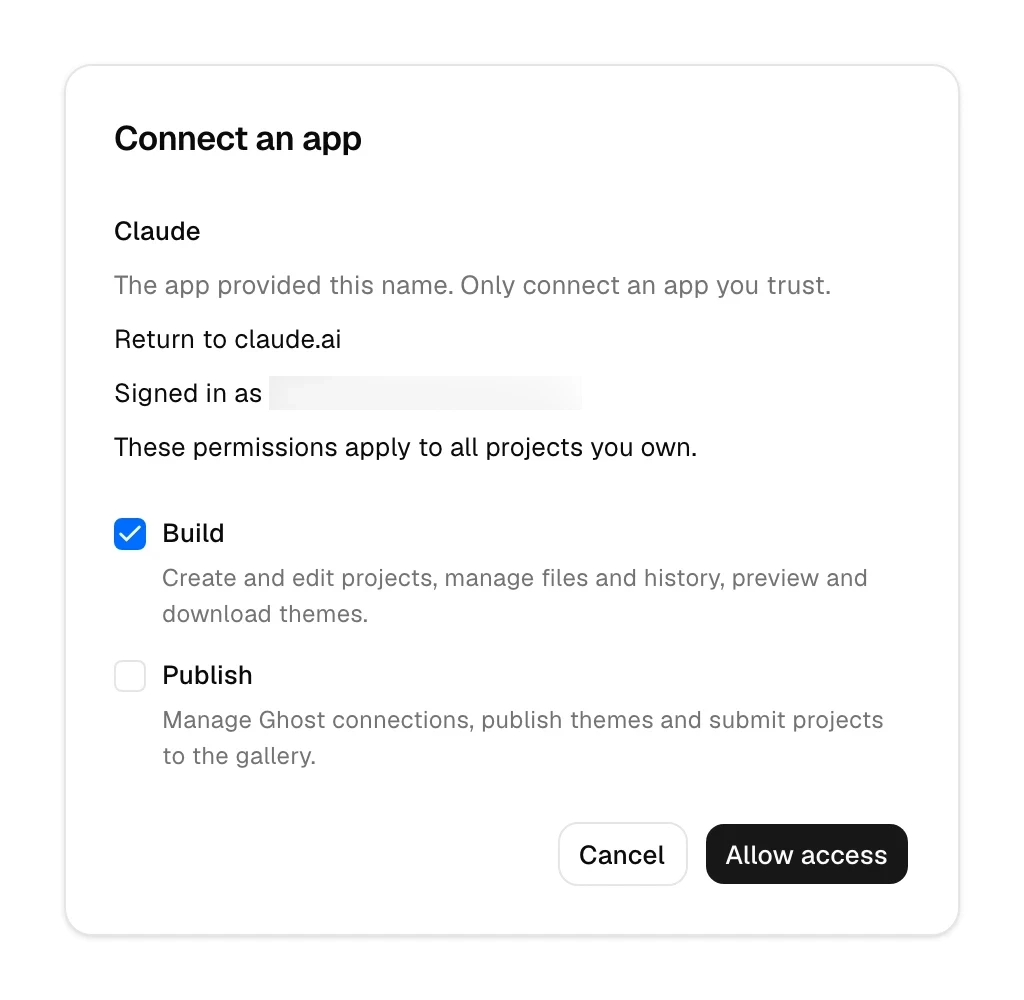
    AI apps such as Claude, ChatGPT, Codex and Cursor can create and edit your Fantasma projects over MCP, the Model Context Protocol these apps use to work with other services. Add Fantasma's MCP URL to the app, sign in, and choose what it may do on every project you own. Build lets it create and edit projects, and Publish lets it manage Ghost connections and publish themes. Downloading and publishing need Pro for an agent as they do for you, and you change or remove its access in Account settings › Connected apps.

    Fantasma's Connect an app page for Claude, with Build checked, Publish unchecked and an Allow access button

    Connect an AI agent has the steps for each app, and What an AI agent can do in Fantasma lists what each permission allows.

    Plans

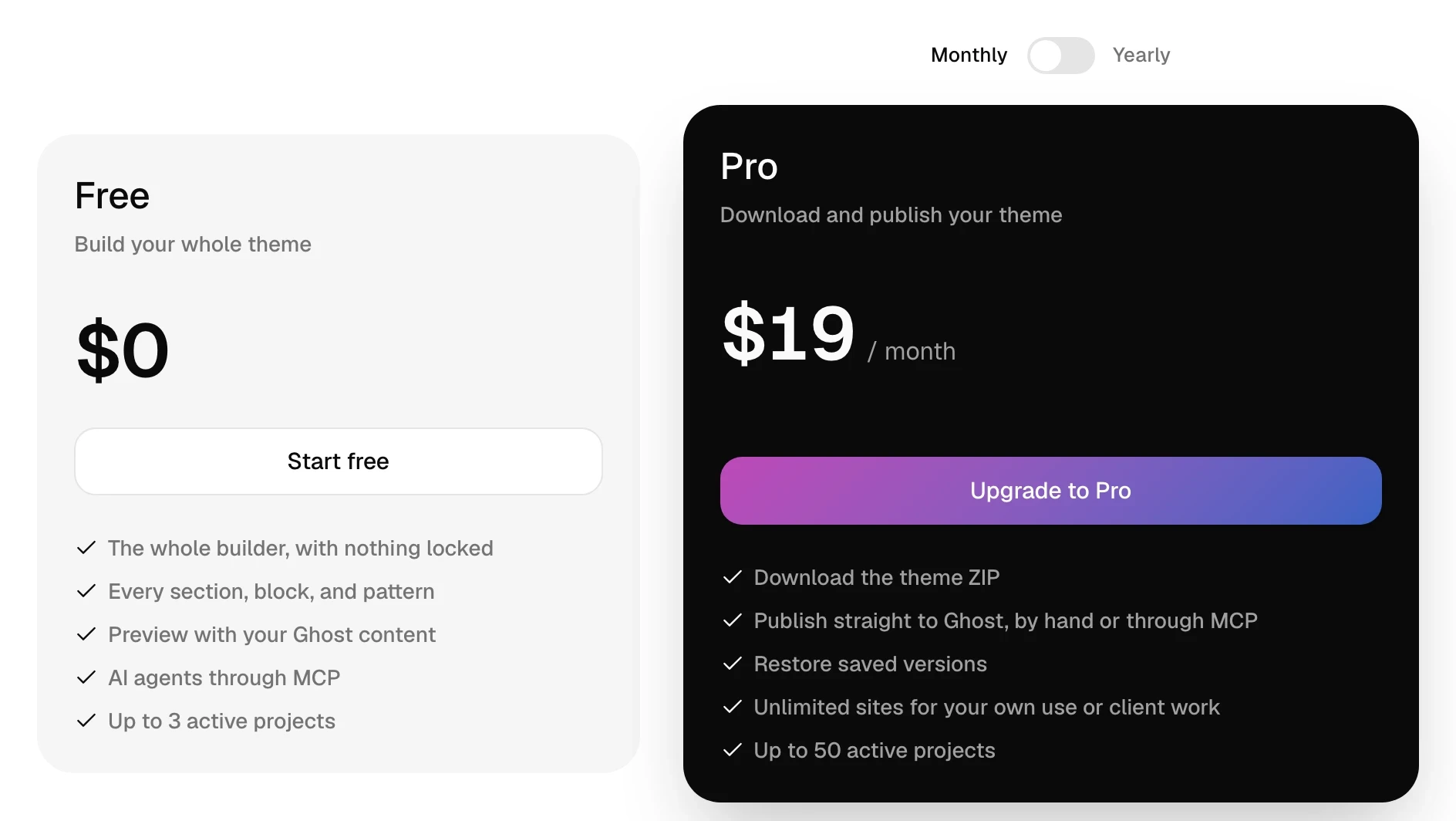
    The Free plan now has every section, block, pattern, template and style, a Ghost connection with your own content in the preview, and AI agents. Downloading the theme ZIP, which Free could do in Fantasma 1, now needs Pro. Publishing to Ghost stays on Pro, and uploading redirects and restoring earlier versions are new Pro features. Pro costs $19 a month, down from $29, and $99 a year as before. Free holds 3 active projects and Pro holds 50, as before.

    The Free and Pro plans side by side, with Pro at $8.25 a month billed $99 yearly

    Free and Pro plans lists every limit, and Upgrade to Pro shows how to switch.

    Your projects

    Each Fantasma 1 section, such as Posts, Cards or Footer, becomes a Section built from blocks, with its content in place. Buttons, corners and text sizes move to the new variants and presets, so look over your pages before you publish again. Fantasma 1 is no longer available, so a converted project stays a Fantasma 2 project. Your Ghost site keeps the theme it has until you publish or upload a new one. A project you made without an account is imported when you sign up in the same browser. Where Fantasma 1 sections and blocks went, at the end of this entry, lists each old name and where to find it now.

    Status colors and custom CSS

    After your next download or publish, Success, Error, Warning and Notice follow each color scheme's light or dark palette. Set them in Styles > Colors.

    If CSS in Ghost Admin's Code injection sets Status variables such as --error on :root, those rules no longer override the scheme's colors. Move these colors into Styles, or update your CSS to target the affected mode and scheme after the theme's stylesheet, as Add custom CSS explains.

    All changes

    • Added one canvas that shows every template as a live page you pan and zoom, with selection, typing on the page and a toolbar over the selected block. Read the guide
    • Added the Group block, which lines blocks up in a stack, a row or a grid and holds other Groups up to ten levels deep. Read the guide
    • Added the Collection block and data blocks, which list your posts, tags, authors and tiers from Ghost in a design you make. Read the guide
    • Added linked patterns: more than 170 built-in patterns, your own patterns, and content areas where each page keeps its own blocks. Read the guide
    • Added Styles and the Style book, for fonts, text styles, color schemes, gradients, shadows, corners, widths, spacing and motion across the whole theme. Read the guide
    • Added variants, states and formats in the Blocks panel, and custom blocks that reuse one design with different content. Read the guide
    • Added the Form block for signup, sign-in and contact forms, the Paywall, Audience rules for members and tiers, and buttons that open Ghost's Portal. Read the guide
    • Added Custom code in Project settings, with scripts that wait for consent in a cookie banner. Read the guide
    • Added Redirects, robots.txt controls with Block AI crawlers, and Staff access tokens that let Fantasma upload routes.yaml and redirects to Ghost. Read the guide
    • Added AI agents over MCP, such as Claude, ChatGPT, Codex and Cursor, with Build and Publish permissions. Read the guide
    • Added Agent instructions in Project settings, Markdown files such as DESIGN.md that AI agents follow when they work on the project. Read the guide
    • Changed the plans: downloading the theme now needs Pro, every builder feature is on Free, and Pro costs $19 a month instead of $29, or $99 a year. Read the guide
    • Changed the builder to need an account, and a project made without one in this browser is imported after you sign up. Read the guide
    • Removed the Fantasma 1 sections such as Posts, Cards, Footer and Logo Cloud, which convert to Sections built from blocks when you open a project. See where each one went
    Show 72 more changes
    • Added separate Tablet and Mobile values for block and section settings. Read the guide
    • Added selecting several blocks at once, to move, group, delete or change them together.
    • Added Cut, Copy style and Paste style for blocks and sections. Read the guide
    • Added a + between blocks to insert a block at that spot, and one block picker that lists every block with the common ones first. Read the guide
    • Added Dialog sections, popups and side panels that a Button opens. Read the guide
    • Added the Gallery block with Grid, Masonry, Justified and Tiles layouts and a lightbox. Read the guide
    • Added Unsplash photos to the Image and Gallery blocks and to section backgrounds.
    • Added pinning, which places a block at a fixed spot over its Group, such as a badge in the corner of a card. Read the guide
    • Added Display rules that hide a block by screen size, section width or the page it is on, such as a locked post. Read the guide
    • Added gradient backgrounds for sections and blocks, from six theme gradients or your own. Read the guide
    • Added Typography settings on text blocks, with font sizes taken from Styles. Read the guide
    • Added rounding for each corner, and Smoothing, which softens where a corner's curve meets the edge. Read the guide
    • Added shadows with several layers, and a custom shadow on a single block.
    • Added Custom CSS on each block and section, and a CSS classes field that takes Tailwind classes. Read the guide
    • Added an HTML anchor to blocks, which only sections had before.
    • Added borders on the sides you choose, with a width for each side, and a background fill on any block.
    • Added Custom to a block's Background and Text color, for any color and its opacity. Read the guide
    • Added Background and Text color to sections, and Text color to Groups, Forms and menu dropdowns, from the + beside Colors. Read the guide
    • Added a choice of Stack, Row or Grid inside a new, empty Group on the canvas. Read the guide
    • Added Width, Height and Aspect Ratio settings that follow the layout a block sits in.
    • Added Social Links blocks that show the accounts you set in Ghost Admin, and Share Link and Share Button blocks. Read the guide
    • Added spacing markers that show a block's padding and gaps when you point at it on the canvas.
    • Added updates to built-in patterns you have not edited, with Keep previous to stay on the old version. Read the guide
    • Added hiding built-in patterns you do not use, and bringing them back. Read the guide
    • Added Google Consent Mode updates from the cookie banner, for Google tags that read them.
    • Added History in Project settings, where you see saved versions and restore one on Pro. Read the guide
    • Added Theme name and a date format in Project settings. Read the guide
    • Added Account settings, with your profile, plan, connected apps and keyboard shortcuts. Read the guide
    • Added submitting a project to the Community Gallery, where other users will start projects from community themes once it opens. Read the guide
    • Added a notice with a link to billing when a Pro payment fails.
    • Raised the number of blocks a project can hold from 900 to 5,000. Read the guide
    • Improved adding a section, which now places an empty Section at once and offers a blank start or pattern previews on the page.
    • Improved number fields, which now take units and change when you drag them.
    • Improved color schemes, which show as tiles with every color editable in light and dark.
    • Improved line breaks in paragraphs on your site, so a last line is less often one word.
    • Changed the name of the Banner section to Section.
    • Changed the header to be built from blocks, such as Site Logo, Navigation Menu and Button, with the phone menu as a Dialog. Read the guide
    • Changed buttons to take their colors, borders and sizes from variants and formats, and converted the buttons in your projects. Read the guide
    • Changed the cards of Recommendations blocks to take their look from the Plain, Filled and Outline variants, with their own Background, Border, Corners and Text color. Read the guide
    • Changed the post filter rule Excerpt Contains to Custom Excerpt Contains, because Ghost filters only the excerpt you write yourself. A saved filter on the excerpt opens in Manual mode with a warning. Read the guide
    • Moved the help center and these release notes to new pages. Links to the old help pages open the matching new article.
    • Changed rounding and text sizes to pick presets from Styles, and moved saved values to the nearest preset or to a custom one.
    • Changed posts written in Ghost Admin to take their headings, buttons, lists and separators from your Styles.
    • Removed the Post Header, Featured Media, Page Header, Tag Header and Author Header sections, which convert to Sections of data blocks.
    • Removed the Authors, Authors List, Tags List and Posts List blocks and the Fantasma 1 Tags block, which convert to Collections.
    • Removed the Card, Card Icon, Card Person and Card Rating blocks, which convert to custom blocks built from Groups.
    • Removed the About, Eyebrow, Buttons and Newsletter blocks, which convert to a Group, a Paragraph, a Group and a Form.
    • Removed the Sharing and Sharing Button blocks, which convert to Share Link and Share Button blocks.
    • Fixed edits typed while a save was running getting lost, and a failed save not trying again by itself.
    • Fixed one very long value, such as a long pasted text or link, stopping every save until you reloaded.
    • Fixed the builder warning that the project changed elsewhere after your own download, publish or rename.
    • Fixed unsaved edits getting lost when your session expired, and signing in again now returns to the project and saves them.
    • Fixed being signed out while you were still working.
    • Fixed the editor keeping another account's project open after you switched accounts.
    • Fixed Undo of a setting not going back to the value before it.
    • Fixed changes to the address of the Tag and Author templates getting lost on reload.
    • Fixed a long layout or template name making every save fail.
    • Fixed link fields changing a URL while you typed it.
    • Fixed SVG and HEIC images failing only after the upload started, and the picker now refuses them at once.
    • Fixed images getting deleted from the media library without asking.
    • Fixed large font files failing with an unclear error, and the upload now names the 4 MB limit and suggests WOFF2.
    • Fixed share links to Reddit and email breaking on post titles with &, # or ?.
    • Fixed the preview showing demo text in place of your connected site's posts and pages.
    • Fixed a Ghost site showing as unreachable after one failed check.
    • Fixed a new Ghost connection keeping the previous site's posts and publish history.
    • Fixed a layout with the same name as a collection overwriting that collection's page in the theme.
    • Fixed header, footer and subscribe labels in layouts that could not be translated.
    • Fixed the preview and the theme file drawing some blocks differently.
    • Fixed error messages that showed internal error text in place of a plain message.
    • Fixed Pro staying locked for up to five minutes after checkout.
    • Fixed a customer with a failed payment being offered a second subscription instead of the billing page.
    • Fixed HTML anchors turning capital and non-Latin letters into hyphens.

    Where Fantasma 1 sections and blocks went

    A converted section keeps its name in the Sections list in the left sidebar, such as "Footer" or "Post Header", even though its type is now Section. Some parts become a use of a custom block, a group of blocks made reusable, listed under Custom in the Blocks panel. See Create a custom block.

    Sections

    Fantasma 1 In Fantasma 2
    Banner The same section, now called Section.
    Footer A Section named Footer. It holds Groups built from blocks such as Site Logo, Navigation Menu, Social Links, Dark Mode Toggle, Separator and a Paragraph with the copyright line.
    Logo Cloud A Section named Logo Cloud, with a Group named Logos that holds an Image per logo. Logo Size became each Image's Height. Muted Logos became custom CSS, under Advanced › Custom CSS in the settings of the Group that holds the logos, or of the section when it holds them itself.
    Cards A Section with its heading blocks and a Group named Cards that holds the cards.
    Posts A Section named Posts, with a Heading and a Collection whose Source is Posts. Sidebar widgets sit beside it in a Group. See Show a list of posts.
    Post Header A Section named Post Header, with the data blocks Primary Tag, Title and Excerpt, and a Byline custom block for the author and date line.
    Featured Media A Section named Featured Media, with the Featured Image data block. On a tag page it shows the tag's image.
    Page Header, Tag Header, Author Header A Section with the same name, built from data blocks such as Title, Excerpt, Post Count, Location and Avatar.
    Navigation The same section. Its menu for phones became a Dialog named Mobile menu, under Overlays in the layout.

    Post Content and Post Comments keep their names and work as before.

    Blocks

    Fantasma 1 In Fantasma 2
    Card A Group. When it matches a built-in card, it is a use of that custom block: Feature Card, Testimonial Card, Category Card, Stat Card or Text Card.
    Card Icon An Icon. Its style became the Icon's background, border and spacing.
    Card Rating A Rating.
    Card Person A use of the Profile custom block. The avatar became an Image, hidden when the card had none.
    About A Group of Site Logo, Heading, Paragraph and Button, as a use of the About custom block.
    Posts List A Collection whose Source is Posts, as a use of the Posts List custom block. A widget title above it became its heading.
    Tags A Collection whose Source is Tags. See Show your tags or authors.
    Tags List A Collection of tags and a View All Button, as a use of the Tags List custom block.
    Authors A Collection whose Source is Authors.
    Authors List A Collection of authors, as a use of the Authors List custom block.
    Newsletter (the subscribe form) A Form holding a Form field custom block, an email Input with a Button. See Add a newsletter signup form.
    Buttons A Group of Buttons in a row or one under another. A button with no label and no icon was removed.
    Button A Button. Its look became a Variant, such as Filled or Outline, and its size a format, such as Small. You pick both at the top of the Button's settings. How each variant looks is set once for every button in the Blocks panel. See How block variants and formats work.
    Eyebrow A small Paragraph with Uppercase formatting, which you change in the text toolbar under More formatting. See Edit text on the canvas.
    Heading, Paragraph The same blocks. A heading styled as a sidebar title became the Widget Title custom block.
    Sharing A Group named Sharing that holds a Share Link for each network. A Ghost share button became a Share Button. A button that was turned off was removed.
    Sharing Button A Share Link.
    Social Links Social Links, which draws your links from Ghost. When it held links you added yourself, a Group named Social Links of Icon Links.
    Social Link An Icon Link. A link that was turned off was removed.
    Recommendations A Recommendations List with a Widget Title above it, as a use of the Recommendations List custom block. See Recommendations.

    Collapse, Custom HTML, Image, List, List Item, Search, Separator, Table of Contents and Video keep their names.

    The Theme tab

    The Theme tab of the right sidebar is gone. Its settings moved:

    Fantasma 1, Theme tab In Fantasma 2
    Ghost connection Project settings › Ghost. See Connect your Ghost site.
    Posts per page Project settings › Features › Posts per page. See Project settings.
    Enable Lightbox Project settings › Features › Lightbox
    Code Syntax Highlight Project settings › Features › Code highlighting
    Featured Video, Featured Video Preview Project settings › Features › Featured video and Featured video preview. See Play a video as a post's featured media.
    Page Transition Styles › Motion › Page transition. See Motion and page transitions.
    Color scheme Styles › Colors. See Change your colors.
    Fonts Styles › Typography. See Change your fonts.
    Container Widths: Wide, Standard, Narrow, Full Styles › Layout › Container widths. See Page widths and spacing.

    Styles is the paintbrush icon and Project settings the sliders icon in the icon rail. The right sidebar's first tab, named after what is open, such as Template, now holds the settings of the open page. The builder shows where everything sits.

  3. 1.4.0

    Video, custom fonts and sign-in with Google

    Fantasma Pro adds video in two places. The Video block plays a YouTube link, a Vimeo link, or an MP4 or WebM file you host, and Banner and Cards sections take a muted looping video behind their content. Visitors who ask for reduced motion, and phones unless you allow them, see the background image instead.

    This release also opens up typography in Pro. A custom font pairing can use any of the 1,946 families in the Google Fonts catalogue, a project can install or upload families of its own, and Bundle fonts in theme writes them into the ZIP so a published site never requests anything from Google.

    • Added the Video block for a YouTube link, a Vimeo link, or an MP4 or WebM file you host. Read the guide
    • Added a video background on Banner and Cards sections, muted and looping behind the section content.
    • Added custom font pairs built from any of the 1,946 families in the Google Fonts catalogue. Read the guide
    • Added project fonts: install a family from the Google catalogue with the weights you pick, or upload your own OTF, TTF, WOFF, and WOFF2 files.
    • Added Bundle fonts in theme, on by default in Pro, so the published site loads its fonts from your own Ghost server instead of Google.
    • Added Continue with Google to the sign-in and sign-up screens.
    • Added Duplicate to the menu on built-in color scheme tiles, so a custom scheme can start from an existing palette. Read the guide
    • Added Collapse on Small Screens to the Table of Contents block, so a long outline no longer pushes the post below the fold on phones.
    • Added AGENTS.md and CLAUDE.md to every theme ZIP, so an AI coding agent is told the theme is build output before it edits a file. Read the guide
    • Improved publish to stop reporting success when Ghost never confirmed the theme was activated.
    • Fixed the builder preview failing to load on the live site.
    • Fixed theme export producing a stylesheet from the wrong plan when two exports ran at once.
    • Fixed duplicating a project with more than about seven images leaving a copy that could never be published.
    • Fixed four built-in font pairings whose heading font never loaded: Bold Statement, Classic Serif, Editorial, and Newspaper.
  4. 1.3.0

    The Custom HTML block, image links and safer autosave

    Fantasma Pro adds the Custom HTML block for ad tags, embeds, and third-party widgets. Image blocks also gained a Click behavior setting, so an image can open the lightbox or link to any URL.

    Autosave is no longer last-write-wins. A window left open for hours now catches up with newer work instead of overwriting it, and a save that fails is visible in the builder.

    • Added the Custom HTML block for pasting raw HTML into a section.
    • Added a Click behavior setting on image blocks: open the lightbox or link to a custom URL. Read the guide
    • Added a conflict warning when a project changed in another window, so a stale tab reloads instead of saving over newer work.
    • Improved the builder to show when a save fails instead of failing quietly.
    • Improved a second open window to pick up saves from the first within seconds.
    • Improved the Ghost connection check to reject an Admin API key that cannot publish themes, instead of failing later at publish time. Read the guide
    • Improved publish errors to name the firewall rule when a host blocks the theme upload.
    • Improved preview failures to show an error with a retry instead of an endless spinner.
    • Changed the privacy policy: analytics now runs on Visitors, which sets a first-party cookie. Privacy policy
    • Fixed publishing to hosts that scan the upload by compressing the theme ZIP.
    • Fixed project images returning 404 in exported themes on Ghost sites installed in a subdirectory.
    • Fixed broken card background and person avatar images in the builder preview.
    • Fixed section horizontal padding ignoring its setting, so None now removes the padding.
    • Fixed two Features presets rendering full width instead of their 900px content width.
    • Fixed the builder preview getting stuck after an upgrade to Fantasma Pro.
    • Fixed a stray page scrollbar in the builder.
  5. 1.2.3

    All nine Ghost social platforms in Social Links

    Social Links now renders site and author accounts with Ghost’s social_accounts helper, so exported themes can show all nine platforms from Settings → General, not just Facebook and Twitter. Your Ghost site needs to be on 6.38 or later.

    • Improved Social Links to show all nine Ghost social platforms from Settings → General, not just Facebook and Twitter.
    • Changed Social Links in exported themes to use Ghost’s social_accounts helper, which requires Ghost 6.38 or later. Ghost docs
    • Fixed Subscribe form submit button layout in Firefox.
    • Fixed default Post template sidebar so new free projects no longer ship with the Pro-only Tags List block, which blocked theme download.
  6. 1.2.2

    Fixes for shared Layouts and dark mode in exported themes

    This patch fixes how Fantasma exports shared Layouts when templates use context-specific sections, preserves dark mode custom settings in exported themes, and clears Ghost site verification and split card display issues.

    • Fixed exported themes shipping invalid per-template layout files for shared Layouts with context-specific sections.
    • Fixed shared Layout export when every assigned template is excluded from scoped layout output.
    • Fixed exported themes missing blocks and sections referenced only in template-specific layout variants.
    • Fixed dark mode custom settings in exported themes.
    • Fixed Ghost site verification when the Admin API sends a gzip header with uncompressed JSON.
    • Fixed split card headers appearing behind fill image backgrounds.
  7. 1.2.1

    Fixes for recommendation links and Ghost connections

    This patch fixes recommendation row links in exported themes and builder preview, restores publish and preview refresh against local Ghost setups, and clears a few builder and sign-in rough edges.

    • Improved magic link sign-in error messages.
    • Fixed recommendation row links to use each site’s external URL.
    • Fixed publish and connected-site preview refresh when Ghost returns gzip-compressed Admin API responses.
    • Fixed post order settings for Latest posts queries.
    • Fixed Post Content sidebar styling in builder preview when position is Up or Down.
  8. 1.2.0

    Custom color schemes and the Posts List block

    Fantasma Pro now supports custom color schemes: name your own palettes, tune light and dark tokens, and use them globally or per section.

    You also get the Posts List block for sidebars, Post Content width and typography tweaks, and preview fixes for inherited templates and connected sites.

    • Added custom color schemes in Theme Settings. Read the guide
    • Added Posts List block to use as widget in sidebars.
    • Added a video icon on post cards and list items when a post includes featured video.
    • Improved Post Content container width and full-width layout.
    • Improved Post Content typography and content cards styling.
    • Improved Post Content sticky sidebar to fade out when wide or full-width cards are in view.
    • Improved first paint by marking likely LCP images as eager.
    • Fixed Posts grid layouts so the hero post in 3-1-3 grids is the first post in document order.
    • Fixed builder preview when templates inherit sections from another template.
    • Fixed connected-site preview mixing Fantasma demo theme settings.
    • Fixed recommendation favicons failing to load.
    • Fixed post card large title size in compact layouts.
    • Fixed Table of Contents clone styling when the widget is duplicated in Post Content.
    • Fixed builder preview when Post Content sidebar position is Up or Down.
  9. 1.1.0

    Shareable builder links and a Post Content sidebar

    Builder URLs now include the open template or layout, so reloads, shared links, and browser history reopen the same view.

    This release also adds a wide-screen Post Content layout with a sticky sidebar, member links on locked Table of Contents entries, and 27 new section presets.

    • Added wide-screen Post Content layout that centers the post column and places Table of Contents and widget blocks in a sticky sidebar when space allows.
    • Added member links on locked Table of Contents entries for member-only posts.
    • Added a featured image lightbox on post and page headers.
    • Added target and rel attributes on external links across exported themes.
    • Added 27 new section presets for heroes, content headers, posts feeds, stats, and CTAs.
    • Added member lock indicators on post cards.
    • Added builder URLs that include the open template or layout, so reloads, shared links, and browser history reopen the same view.
    • Improved Post Content on narrow screens: the Table of Contents widget moves above the article when the sidebar stacks below the post.
    • Improved Ghost content refresh loading state on the connection card.
    • Improved Table of Contents to hide the heading directly above it when the table has no anchor links.
    • Changed the default wide container width to 1400px to pair with the Post Content sidebar layout.
    • Changed exported themes to load page scripts from one shared JavaScript file.
    • Fixed Post Content sidebar offset with the wide-screen layout.
    • Fixed featured video scripts loading in the page footer.
    • Fixed Ghost search displaying when mobile navigation open.
    • Fixed export dropping HTML color mode.
    • Fixed author cover layout spacing when card style is hidden.
    • Fixed footer social links not rendering in exported themes.
    • Fixed Recommendations block still showing a description when the Description setting is off.
    • Fixed tag header content width.
  10. 1.0.0

    Out of beta, with Fantasma Pro and Layouts

    Fantasma is leaving beta with Fantasma Pro, a paid subscription that adds Ghost theme publishing, uploads, connected site preview, page transitions, and a higher active-project quota.

    This release also adds Layouts, 45+ new section presets, trash and restore for projects, and tighter checks on project saves.

    Plans and billing

    Ghost connection

    • Added Ghost site connection for direct theme publishing and builder previews with Ghost content. Read the guide
    • Improved theme ZIP naming so downloads follow the project name more reliably.

    Templates and layouts

    • Added Layouts for shared Navigation, Footer, and template structure. Read the guide
    • Added custom templates for advanced Ghost routes.
    • Added tagged Post and Page templates.
    • Added recommended page templates: About, Contact, Authors, Tags, and Recommendations.
    • Added recommended collection templates: Projects, Courses, Writings, and News.
    • Added recommended error templates: 404, 4xx, and 5xx.

    Sections, blocks, and presets

    • Added 45+ new section presets.
    • Added dark mode support. Read the guide
    • Added page transition effects. Read the guide
    • Added featured video support. Read the guide
    • Added code syntax highlighting.
    • Added dropdown navigation support. Read the guide
    • Added Table of Contents block.
    • Added widget position controls and a wide-screen sidebar layout option to Post Content.
    • Added Authors and Authors List blocks.
    • Added Tags and Tags List blocks.
    • Added Recommendations and Recommendations List blocks.
    • Added custom social links.
    • Added Ghost native Share button support to the Sharing block and Post Header.
    • Added more button size, radius, color, and icon options.
    • Changed Sharing block styles and settings.
    • Changed Social Links block styles and settings.
    • Changed Banner text width to follow the section content width.

    Builder and project management

    • Added copy and paste for sections and blocks.
    • Added editable labels for inserted sections and blocks.
    • Added image library. Read the guide
    • Added trash and restore for projects in your account.
    • Improved left sidebar structure.
    • Improved template and layout context menus.
    • Improved add-section and insert controls.
    • Improved image upload field interactions.
    • Improved settings panels, dropdowns, tabs, badges, buttons, and icon pickers.
    • Improved preview loading states, selection outlines, and scroll behavior.
    • Changed Free accounts to allow up to three active projects. Read the guide

    Security and data handling

    • Improved project writes with server-side API checks.
    • Improved project state validation, sanitization, normalization, and size limits.
    • Improved rate limits for theme downloads, uploads, duplicate, preview, and Ghost routes.

    Fixes

    • Fixed duplicated builder instance IDs.
    • Fixed Posts list empty-state rendering.
    • Fixed search and subscription form styling.
    • Fixed featured media sizing.
    • Fixed mobile navigation icon behavior.

    Migration notes

    • Added loading for older saved projects with automatic migration to the new project schema.
    • Banner migration guidance: review content width if hero text looks wider than before. Adjust content width under Layout → Content width.
    • Block migration guidance: review Sharing and Social Links on the page; these blocks were updated substantially.
    • Layouts guidance: move repeated Navigation and Footer sections into a Layout when they should stay synced.
    • Changed Free tier behavior: active projects are limited to three per account.
    • Removed template reset action buttons.
  11. 0.6.0

    A consent checkbox and notice text in subscribe forms

    Subscribe forms now support notice text with rich text and an optional consent checkbox. Form, layout, and translation fixes cover the rest.

    • Added subscribe form notice text with rich text support and an optional consent checkbox.
    • Improved form styling inside content areas, including better button alignment for form layouts.
    • Improved heading wrapping with balanced text.
    • Applied the theme accent color to native form controls in content areas.
    • Fixed search block alignment issues in rendered layouts.
    • Fixed stacked author image presentation on post cards and post pages.
    • Fixed untranslated interface strings in exported themes.
    • Fixed mobile menu logo focus outline.
    • Fixed section card columns hiding when a background image is enabled.
  12. 0.5.0

    Lightbox, share buttons and a post sidebar

    Image and gallery cards can open in a lightbox. Post layouts get a sharing block and new sidebar presets. Downloads and published themes load scripts and styles in a steadier order.

    • Added a lightbox setting for image and gallery cards.
    • Added sharing block with post-content sidebar support.
    • Added post-content sidebar and narrow presets.
    • Improved how exported themes load shared scripts and styles across templates.
    • Improved Post Content spacing, sizes, and styles.
    • Fixed conflicts with Ghost helpers by reserving helper names and migrating legacy button url fields to href.
  13. 0.4.0

    A closer match to Ghost's Source theme

    Closer match to Ghost Source themes, fewer style clashes, and block editing that works the same in the canvas and sidebar.

    • Added smooth scroll support and common Source theme classes for better compatibility with Source-based custom styles.
    • Added bordered button color selection for more flexible CTA styling in sections that use bordered button variants.
    • Improved nested block editing by supporting context menus consistently in both the preview canvas and sidebar.
    • Switched navigation rendering to the standard Ghost {{navigation}} partial for closer Source theme behavior.
    • Fixed block field naming and button config migration paths to avoid Ghost rendering conflicts and preserve legacy button content.
    • Fixed style conflicts by removing the social links .nav class and correcting bordered color mapping in card-icon and eyebrow blocks.
  14. 0.3.0

    A faster builder and more reliable theme downloads

    The builder should feel faster day to day. Theme downloads and project upgrades fail less often in practice.

    • Added rich text field support and safer reserved field name handling.
    • Added automatic migration for outdated block and section settings when you open older projects.
    • Improved preview performance with less stutter while you edit.
    • Improved loading states, auth flow reliability, and project switching UX.
    • Fixed theme packaging to better detect used templates/styles and avoid broken download cases.
  15. 0.2.0

    FAQ, testimonial and rating presets, cleaner theme downloads

    Downloaded themes install more cleanly in Ghost. FAQ, testimonial, and rating presets speed up new pages.

    • Expanded preset and block library (FAQ, testimonials, ratings) for faster page setup.
    • Added pagination and About sidebar block to Posts layouts.
    • Normalized image URLs in theme ZIPs to reduce broken media after theme install.
    • Improved migration and download dialogs for clearer project transfer and download flow.
    • Fixed Ghost helper compatibility, including concat behavior.